Compiled models with TVM: introduction
This scenario takes a trained model, compiles it into native CPU code with the TVM runtime and serves it through the Open Inference v2 protocol. The model is YOLOv8n, an object detector exported to ONNX.
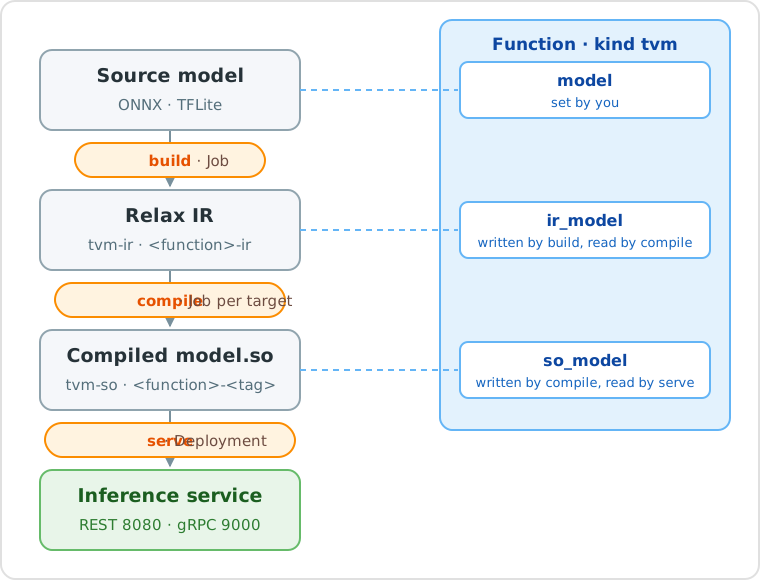
The scenario has two parts:
- Build, compile and serve: upload the model, create a TVM function, run
build,compileandserve, and compile the same model for ARM devices. - Test the model: send a picture to the service from your computer, run the model locally with Docker, or on a Raspberry Pi.
Deployment steps show both the console and CLI (dhcli). The test page
provides a Python client. Start with untuned compilation to check the pipeline;
use MetaSchedule to investigate performance.
Names used in this scenario
| What | Name |
|---|---|
| Project | tvm-test |
| Source Model | yolo |
| Function | yolo-function |
| IR Model | yolo-function-ir, kind tvm-ir (created by build) |
| Compiled Models | yolo-function-amd64, yolo-function-arm64, yolo-function-arm32, kind tvm-so (created by compile) |
Use your own names if you prefer, and change the commands accordingly.
Prerequisites
- A project on the platform. To create it from the CLI:
dhcli create project -n tvm-test. -
The CLI, version 0.15 or later (it provides
port-forward), registered on your platform and logged in:dhcli register https://core.my-digitalhub-instance.it dhcli login -
Python 3 with
numpyandPillow, to test the model. - Docker, only to run the model on your computer or on a device.
-
The ONNX model. Export YOLOv8n with the Ultralytics package:
pip install ultralytics
yolo export model=yolov8n.pt format=onnx imgsz=640 batch=1 dynamic=False nms=False
This normally creates
yolov8n.onnxwith inputimages[1, 3, 640, 640]and output[1, 84, 8400]. Check the exported signature: the test client assumes this detection layout and does its own non-maximum suppression.